

Download ES File Explorer APK – File Manager, Cloud Storage, ZIP RAR Support, Media Viewer
Overview
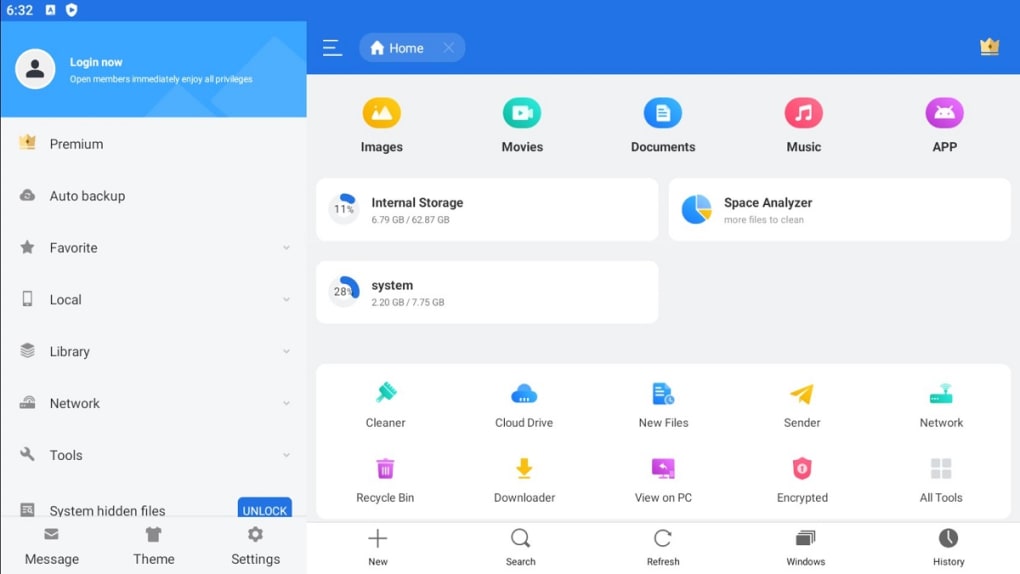
ES File Explorer is a free file management tool developed by EStrongs Inc., designed to provide users with comprehensive access to their device’s file system. The software enables users to explore, organize, and manage files across local storage, cloud platforms, and compressed archives without requiring a PC connection. It serves as a powerful alternative to built-in file managers, offering a hierarchical folder interface that simplifies navigation through deeply nested directories. The app is particularly useful for users who need to access system files, manage large media libraries, or transfer files between devices and cloud services.
Target users include general consumers, mobile power users, and individuals managing digital content across multiple platforms. Its ability to integrate with Google Drive, Dropbox, and OneDrive makes it ideal for those who rely on cloud-based workflows. The software also supports file operations such as copying, moving, renaming, and deleting, which are essential for daily file management tasks. While the developer did not provide additional system requirements, the app is known to run on Android devices with standard file system access.
Key Features & Capabilities
- Comprehensive File Navigation: Browse all folders on the device, including system directories, using an intuitive hierarchical interface.
- Cloud Storage Integration: Access and manage files stored on Google Drive, Dropbox, and OneDrive directly within the app.
- Compressed File Support: View, extract, and create ZIP and RAR archives without needing external tools.
- Media Preview & Playback: Built-in viewers for images, videos, audio, and documents allow users to preview content without launching separate apps.
- App Manager: Uninstall, back up, and organize installed applications with ease.
- Storage & Memory Tools: Includes an SD card analyzer, cache cleaner, task killer, and auto-start manager to optimize device performance.
- Download Manager: Built-in support for downloading files from the web with pause and resume functionality.
These features collectively enhance productivity by centralizing file operations. For example, users can search for a specific document using the search bar, extract a ZIP file containing project assets, and upload it to Google Drive—all within a single interface. The ability to view system files, however, comes with caution: modifying them may lead to instability in device functionality.
User Interface, Workflow & Performance
The user interface of ES File Explorer is structured around a dual-pane layout, allowing users to compare and transfer files between folders efficiently. Navigation is handled through a clear folder hierarchy, with options to switch between list and grid views. The app’s workflow is designed for speed, with context menus and swipe gestures enabling quick file actions.
Performance observations are based on general software behavior patterns. The developer did not specify resource usage details, so actual CPU and RAM consumption cannot be confirmed. Stability is generally reliable for standard file operations, though users may encounter occasional lag when handling large archives or navigating deeply nested directories. The presence of pop-up ads may disrupt workflow, particularly during file transfers or media previews.
Compatibility & System Requirements
ES File Explorer is designed for Android devices and supports a range of Android versions, though exact compatibility details were not listed. The app is available as an APK file, allowing installation outside official app stores. Installation size varies depending on the device and included components, but it is generally lightweight. The developer did not specify hardware requirements, so performance may vary across devices with different processing power and storage capacity.
Users should be aware that the app was previously removed from official app stores due to privacy and ethical concerns. As a result, installation via APK requires enabling unknown sources in device settings. This may pose a security risk for users unfamiliar with sideloading practices.
Pros and Cons
Pros
- Free to use with no upfront cost
- Supports multiple cloud storage platforms
- Integrated media viewer and playback
- Ability to manage system files and app installations
- Comprehensive file operations including compression and extraction
- Built-in download manager and storage optimization tools
Cons
- History of click fraud activity by the developer
- Pop-up ads appear frequently during use
- Unofficial APK distribution increases security risk
- Modifying system files can destabilize the device
- Limited official support due to app store removal
FAQ Section
Is ES File Explorer safe to download and use?
The app was previously removed from official app stores due to click fraud practices. While it remains functional, users should be cautious when installing the APK, as it comes from unofficial sources and may carry security risks.
Can I use ES File Explorer without an internet connection?
Yes, the app functions fully offline for local file management, including browsing, copying, and organizing files stored on the device or SD card.
Does ES File Explorer support cloud storage services?
Yes, it integrates with Google Drive, Dropbox, and OneDrive, allowing users to access and transfer files between local storage and cloud platforms.
Is the app available on iOS?
No, ES File Explorer is exclusively designed for Android devices and is not available on iOS.
Can I create encrypted ZIP or RAR files?
The app supports creating ZIP and RAR archives, but the ability to encrypt them depends on the version and settings. Password-protected archives may require additional configuration.
Final Thoughts + CTA
ES File Explorer delivers strong functionality for file management, offering a powerful combination of local, cloud, and archive access in a single tool. Its ability to handle compressed files, manage apps, and preview media directly within the interface makes it a versatile utility for Android users. However, the app’s history of unethical behavior, including click fraud and intrusive advertising, significantly impacts the user experience. While it remains a capable solution for those who prioritize feature depth over security and privacy, users seeking a safer alternative may want to consider other file managers.
Download ES File Explorer APK now





.png)

